FeaturesReminders, Up next and the calendar

It follows up

Give something a date and Moonto keeps track of it: a reminder when it's time, Up next for what's coming, and the calendar for any day.

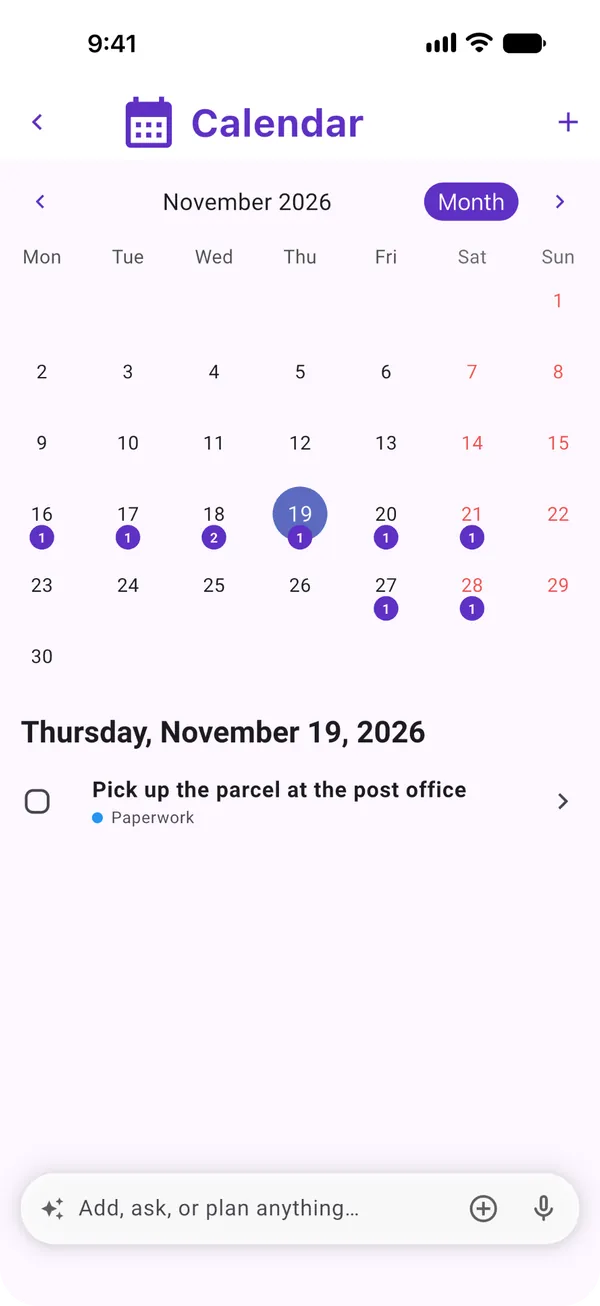
Moonto's calendar for a month, with a count under each day that has something due, and the selected day's task below.

Following up

Nothing with a date gets forgotten.

Reminders, Up next, the calendar, notifications and widgets are free on every plan. Asking Moonto in your own words, « remind me Friday to call the bank », comes with Premium, after a free AI trial: 7 days, or less if you use it a lot.

A reminder on a task

Free

On a task, tap Reminder and pick In 1 h, This evening, Tomorrow 9:00 or Next week, or any date and time. The reminder reaches every phone and tablet you're signed in on, even when the app is closed. Open it and Moonto takes you to the task, with Done to check it off or Later to be reminded again in an hour.

A whole list can have reminders too, in its settings under List reminders: check the shopping list every Saturday morning, say. A reminder can happen once, or every day, week or month.

You set
« Renew car insurance », reminder Friday 9:00
Friday 9:00
Reminder · Renew car insurance on your lock screen; Done checks it off
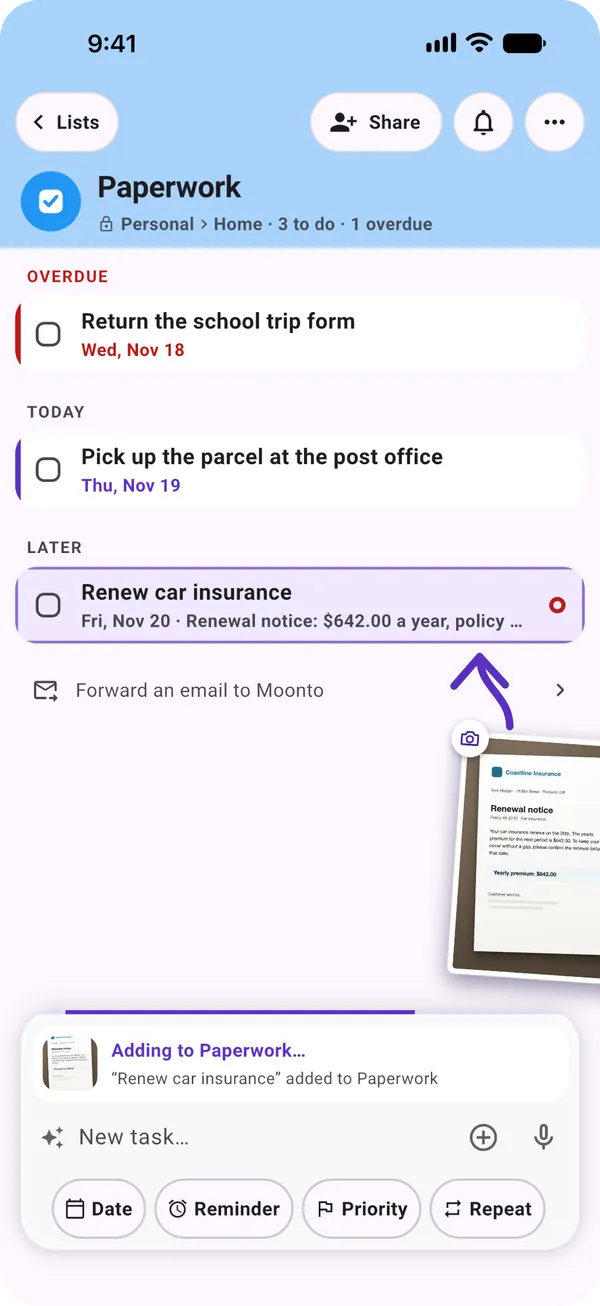
A task being added, with the Date, Reminder, Priority and Repeat chips under the field

Things that come back

Free

Set a task to repeat every day, every 2 weeks, every month or every year. When you check it off, the next one comes back by itself on its next date, with its reminder moved along. The next date counts from the old due date, not from the day you checked it off, so paying the rent late does not push next month's back.

A shopping item set to repeat comes back on the list the same way. And when you do something regularly without saying so, Moonto notices and offers to repeat it for you.

You check off
Pay the rent, repeating every month
Moonto
Brings Pay the rent back for next month, reminder included

Up next

Free

Up next gathers everything with a date, from all your lists, on one screen. Now is the one thing to deal with next, anything whose date has passed first. Today is the rest of today, and This week the six days after, with the calendar one tap away.

Swipe the Now card one way to mark it done, the other way for Not now, which puts it aside until tomorrow. At the top of My lists, a line shows what's next and how many things are due today; tap it to open Up next.

On My lists
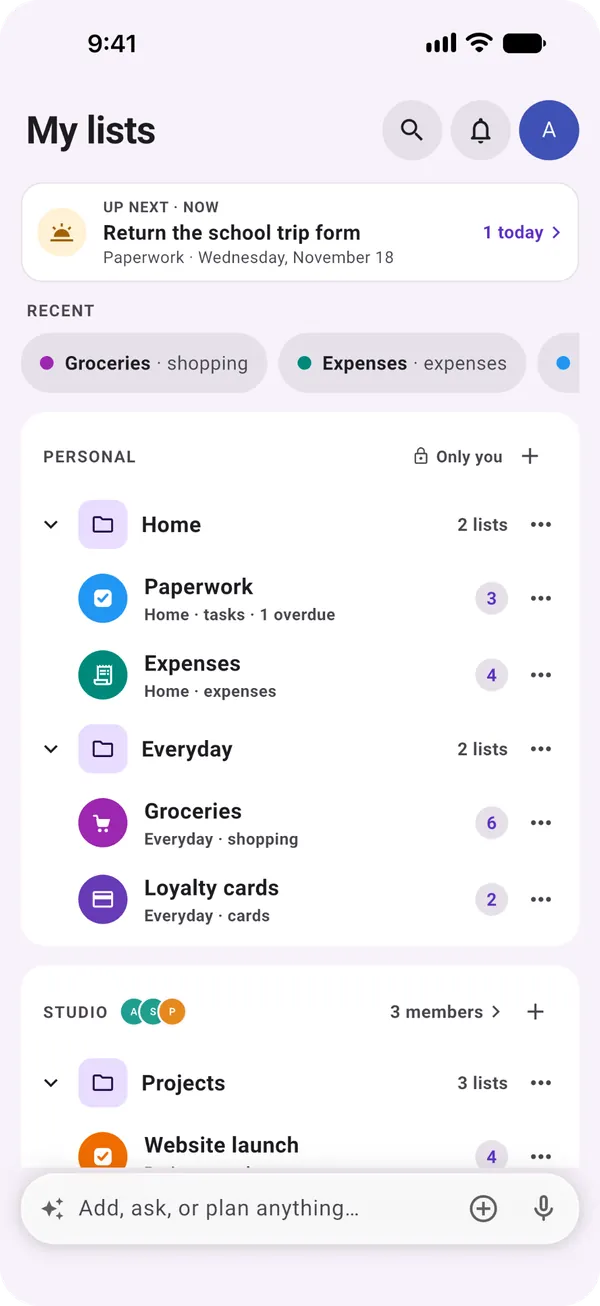
Up next · Now: Return the school trip form · 1 today
You tap it
Up next opens: the form first, then today, then the week ahead
The My lists page with the Up next line at the top: the next task, its list, its date, and « 1 today »

The calendar

Free

The calendar shows the same things by day: tasks by their date, notes and expenses by theirs, and the events you add yourself with « + », with a duration and a reminder. View a month, two weeks or a week; the number under a day says how much it holds.

Tap a day to see what's on it and check a task off from there. Nothing is copied: change a date in a list and the calendar follows.

You tap
Thursday the 19th
The calendar
Pick up the parcel at the post office, from its list, with its check box
The calendar in month view, the 19th selected, showing one task from the Paperwork list

Notifications

Free

Moonto notifies you of your reminders, of what others add or check off on a shared list, and of shopping that's due again. The bell at the top of My lists keeps the last 30 days, so nothing is lost if you swiped one away.

A list that is too chatty can be muted in its settings. In Settings › Notifications, you choose what Moonto may send you at all.

Sam adds
Oat milk, on your shared groceries
You see
« Sam added “Oat milk” to Groceries »

Shared lists: who is reminded

Free

A reminder you set reminds you. On a shared list, turn on Notify all members and everyone on the list gets it, on each of their devices.

A task can be assigned to a member. In Up next, a task someone else holds shows their name, so you know it's taken care of.

You set
« Take the bins out », Monday 19:00, Notify all members
Monday 19:00
Everyone on the list gets the reminder

Up next on your home screen

Free

The Up next widget, on iPhone and Android, shows what's next with the time left, what's later today and what's coming tomorrow, without opening the app.

It moves on by itself as the day goes by. The larger size also shows what's running low on your shopping list.

  • NextThe next thing, « in 40 min »
  • Later todayThe rest of the day, in order
  • TomorrowHow much is coming tomorrow
  • Running lowShopping that's due again

How to start

Three steps.

  1. Give it a date

    Add a date to a task, a note or an expense. It shows in Up next and on the calendar straight away.

  2. Turn on notifications

    Moonto asks once. You can change it any time in Settings › Notifications.

  3. Add the widget

    Put Up next on your home screen, and see what's next without opening the app.

Send it to Moonto.

On iPhone, Android and the web, in 8 languages. Free to start.

Everyone you share with uses it free.