
FeaturesSearch across everything

Find it again

One search for every list you have, your own and the ones shared with you. Type a word, or what you remember of it: Moonto finds the row and opens it where it is.

The My lists page, with the search button at the top, next to the bell.

Search

You remember roughly. That's enough.

The search page is free on every plan. Asking Moonto in your own words, « is anything still unpaid? », comes with Premium, after a free AI trial: 7 days, or less if you use it a lot.

One search for every list

Free

Tap the magnifier at the top of My lists. Moonto looks through every list you can open: your own, the ones in your spaces and the ones shared with you, of every kind, including rows you have already checked off.

Each result shows its list. Tap it and the row itself opens, not just the list it is in, ready to read, edit or check off. Search needs a connection.

You search
« insurance »
Moonto finds
Renew car insurance, in Paperwork, with the note from the renewal notice
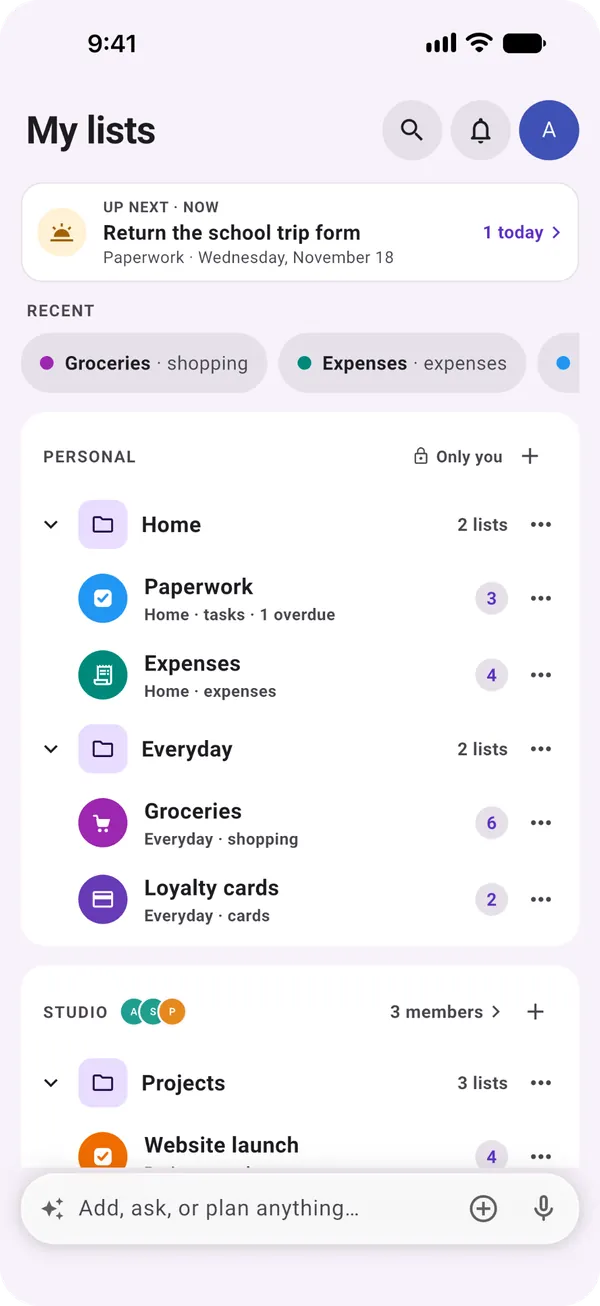
The My lists page with the search button at the top, then Up next, recent lists and lists in groups

By word, and by meaning

Free

A word matches whatever its form: « box » finds « boxes ». For a short search, the first letters of a word are enough. Word matches come first.

Moonto also compares what things mean, so a row can turn up even when it uses other words than yours. Those only show when they are close to what you typed, so the results stay short.

You search
« bike »
Moonto finds
Bicycle helmet, though the word « bike » appears nowhere in it

What is searched

Free

The name of each row, its description and its text fields: the whole text of a note, a person's company, phone, email and what you noted to remember.

Photos, attachments and the barcode of a card are not searched, and neither is About me, the facts you keep for the assistant.

  • ShoppingThe item and its note
  • TasksThe task, its notes, place and contact
  • NotesThe title and all the text
  • PeopleName, company, phone, email, To remember
  • ExpensesWhat the expense was
  • CardsThe card's name

Narrow it down

Free

Under the search field, a chip for each kind of list you have, tasks, notes, expenses and so on, keeps only that kind. When you are in a shared space, you can search that space alone.

Inside a list, « Search in the list » in its ⋯ menu narrows that one list to what you type.

You search
« Sam », with People on
Moonto finds
Sam in your People list, not every note that mentions Sam

Or ask Moonto

Premium

In the bar at the bottom of the screen, ask in your own words: « what's left to buy? », « when is the dentist? », « is anything still unpaid? ». Moonto searches your lists for you and answers.

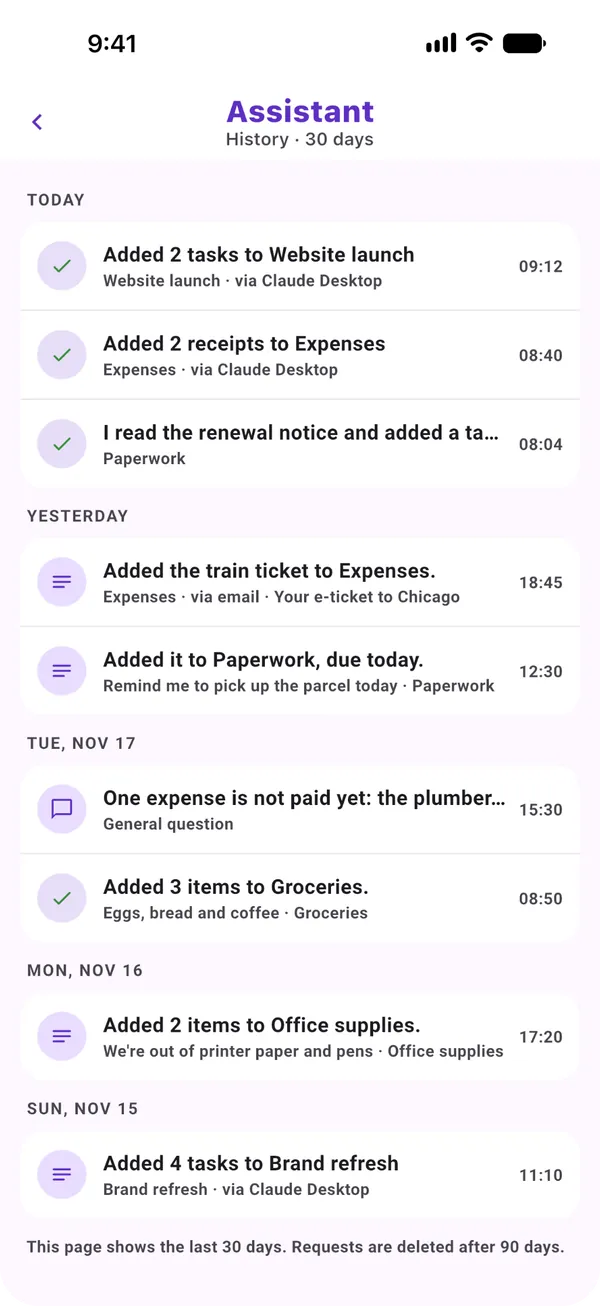
When the answer is a row or a list, Moonto opens it on screen. Your questions stay in the assistant's history.

You ask
« Is anything still unpaid? »
Moonto
« One expense is not paid yet: the plumber… »
The assistant's history, with requests by day, among them an answered question about an unpaid expense

From the AI assistant you use

Free: reading

Connect your own AI assistant, such as Claude or ChatGPT, and it can search your lists too, with the same search. Reading is free on every plan.

You ask your assistant
« Where did I note the boiler's serial number? »
It finds
The note in your Moonto lists, and answers with the number

How to start

Three steps.

  1. Tap the magnifier

    At the top of My lists, next to the bell.

  2. Type what you remember

    A word, the start of one, or what it was about. Add a filter if the list is long.

  3. Open the row

    Tap a result: the row opens in its list, ready to edit or check off.

Send it to Moonto.

On iPhone, Android and the web, in 8 languages. Free to start.

Everyone you share with uses it free.