

FeaturesThe assistant

The assistant

The bar at the bottom of every screen. Type it, say it or show it, in your own words: Moonto adds it to the right list, changes what's there or finds it for you. Everything it does can be undone.

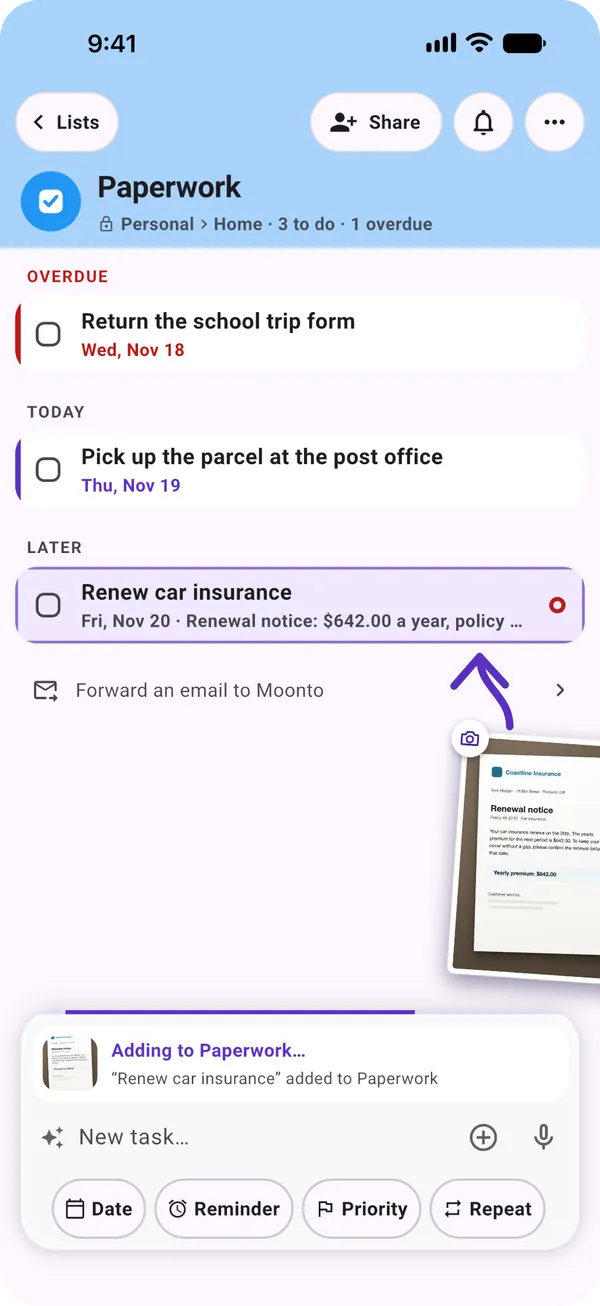
A Paperwork list: a photographed renewal notice has just been added as « Renew car insurance », Fri, Nov 20, with the amount. At the bottom, the bar with a plus button and a microphone.

What you can ask

Say it the way you'd say it to a person.

The assistant comes with Premium, after a free AI trial: 7 days from your first request, or less if you use it a lot. Typing straight into a list stays free on every plan.

The bar at the bottom

Free: into a listPremium: asking Moonto

On the main screen, the bar says « Add, ask, or plan anything… ». Write what you need and Moonto works out the list, the date and the details.

Inside a list, what you type is added to that list straight away, on every plan. To hand it to the assistant instead, tap the « Ask Moonto » row under the field.

You ask
« milk and eggs, and remind me to call the bank on Monday at 10 »
Moonto
Milk and Eggs on your shopping list, Call the bank in your tasks for Monday 10:00, with a reminder
Add, change, find

Premium

It works with the lists you already have, and several things in one sentence are fine: each one goes where it belongs.

  • Add« Lunch with the client, €42 »
  • Change« Move the dentist to Thursday »
  • Find« What's left to buy? »
  • Tidy up« Check off everything on the groceries »

Typed, spoken or photographed

Premium

Tap the microphone and talk, or tap + to add a photo: a letter, a receipt, a shopping list written on paper. Moonto reads it and files what matters.

You ask
A photo of a handwritten list: bread, tomatoes, washing powder
Moonto
Three items on your shopping list, with Undo
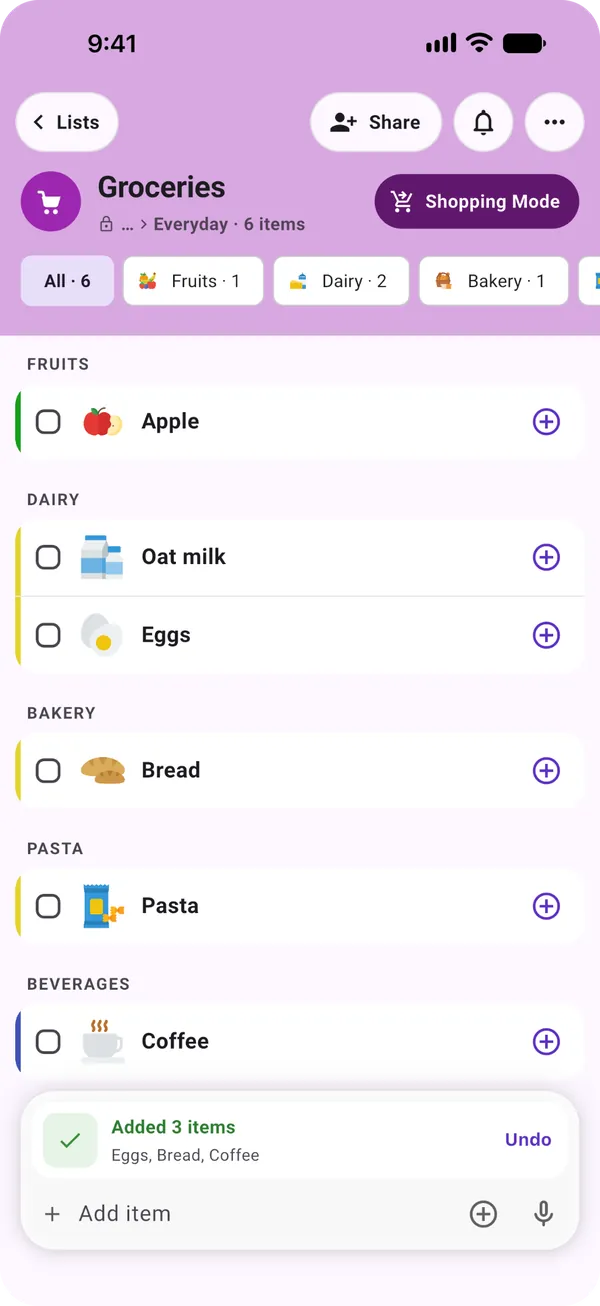
A Groceries list showing « Added 3 items: Eggs, Bread, Coffee » with Undo

It asks when something is missing

Premium

Some rows need a detail: an expense needs its amount. When you leave it out, Moonto asks rather than guessing, and your answer completes the request.

You ask
« Add the taxi to the airport to my expenses »
Moonto
« How much was it? » You answer « 38 euros », and the expense is saved

It shows you, on screen

Premium

Ask for something and Moonto takes you there: it opens the list, shows the items you asked about, opens one item, or opens the calendar on a day.

You ask
« When is the car insurance due? »
Moonto
Opens Renew car insurance in Paperwork: Friday, Nov 20

It picks the right list

Premium

Asked from inside a list, it adds there unless you name another. From the main screen, it picks the list whose name, space and description fit best, and asks you only when two fit equally well.

When none of your kinds of list fits, it can propose a new one; nothing is created until you confirm.

You ask
« printer paper and pens », with a Groceries list and an Office supplies list
Moonto
Both items on Office supplies

You stay in charge

Everything it does, you can see and undo.

History and Undo

Premium

When a request finishes, the strip above the bar offers Undo. Older requests are in the assistant's history: in Settings › Assistant history, or with a long press on the sparkle icon. Open one and tap Undo.

The history shows the last 30 days, including what your connected AI assistant and your forwarded emails added. Requests are deleted after 90 days.

You ask
Undo yesterday's « Added 3 items to Groceries »
Moonto
The three items are gone. Rows you had already deleted yourself are skipped.
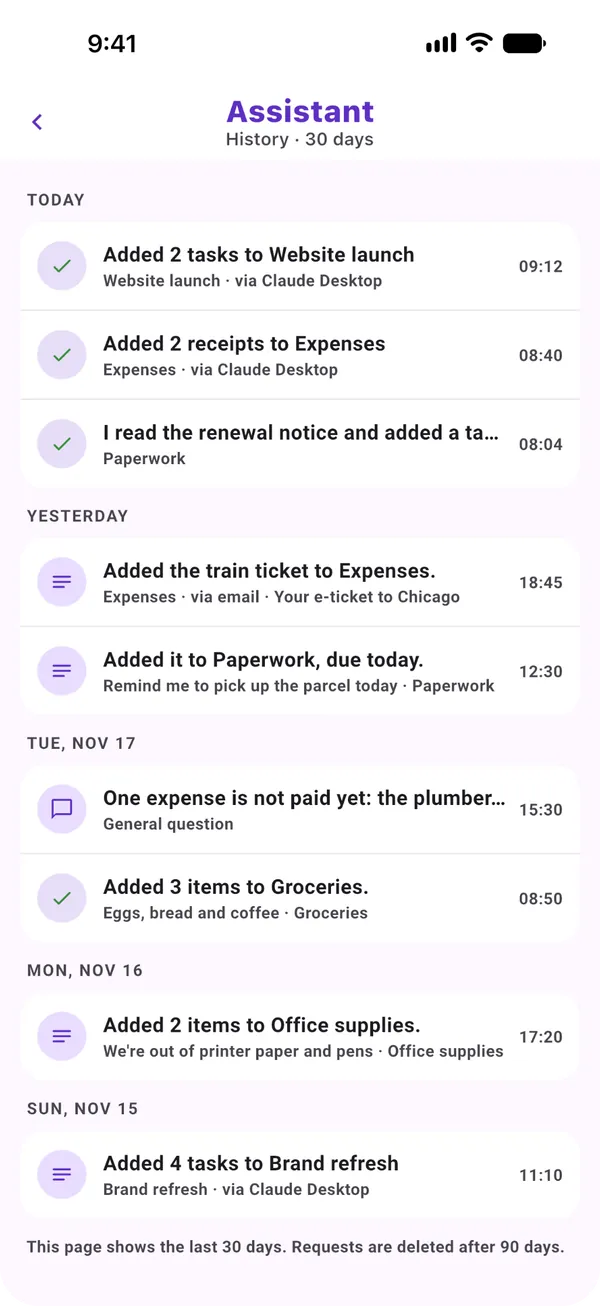
The assistant's history: requests by day, each with its list, some via Claude Desktop or via email

About me

Premium

Tell Moonto something about yourself and ask it to remember: it keeps the fact and uses it in later requests. It saves a fact only when you ask it to, never from what you buy or do. You see every fact in About me, and you can edit or delete any of them.

You ask
« Remember that I'm vegetarian »
Moonto
Noted in About me, where you can change or remove it

What it never does

Moonto never pays, sends or books anything for you. The assistant works in your lists: it adds, changes, finds and shows. What you store is never used to train AI models.

You ask
« Pay the electricity bill »
Moonto
A task, Pay the electricity bill, in your list. Paying stays with you.

Premium, and fair use

FreePremium

Your free AI trial starts with your first request to the assistant, not when you sign up. It lasts 7 days, or ends sooner if its AI allowance runs out. After it, the assistant, voice and photos come with Premium, at €7.99 a month or €74.99 a year.

Premium is fair use: Settings shows how much of the month's AI use is left. If it runs out, the assistant pauses until it resets; your lists keep working.

  • Free, every planTyping into a list, sharing, search, reminders
  • PremiumAsking Moonto, typed, spoken or photographed

How to start

Three steps.

  1. Get Moonto

    From the App Store, Google Play or your browser, and sign in.

  2. Ask your first thing

    Type in the bar at the bottom, tap the microphone, or add a photo. Your 7-day trial starts there.

  3. Check what it did

    The strip above the bar says what changed, with Undo. Tap it to see the answer.

Send it to Moonto.

On iPhone, Android and the web, in 8 languages. Free to start.

Everyone you share with uses it free.