
No ads
Moonto shows no advertising, and the app does not use your device's advertising identifier. We do not sell your personal data, and we do not share your lists with advertising networks. You pay for Premium, not with your data.
FeaturesYour data
No ads. What you store is never used to train AI models. Your lists are stored in Belgium, and you can export everything, or delete it all, whenever you like.
The promises
These hold on every plan, free or Premium. Our privacy policy says each of them in full.
Moonto shows no advertising, and the app does not use your device's advertising identifier. We do not sell your personal data, and we do not share your lists with advertising networks. You pay for Premium, not with your data.
Moonto does not train any AI model on what you store. Moonto's AI uses a Google model through Google Cloud, whose terms state that your data is not used to train its models either.
Your lists, contacts, cards and account are stored in a Google Cloud database in Belgium (europe-west1), and the search index is built there too. Photos and files you attach are kept in Firebase Storage, in the same Google Cloud project.
When you use Moonto's AI, the request goes to Google's global endpoint, so it may be processed outside the European Union. Google does this on our behalf, under its Cloud data processing terms and the EU Standard Contractual Clauses. Your lists stay stored in Belgium.
Only what a request needs. When you ask Moonto something, the model receives your message; the name, kind, space and description of each of your lists; your « About me » facts; your language, the date and time, and the open list; your last exchanges from the past ten minutes; and the rows it looks up, at most 50 at a time. Nothing else.
Voice recordings and photos you send are not kept; only the transcript of a voice message stays, in your history. A little work also runs in the background:
In your hands
All of this is in Settings, on every plan.
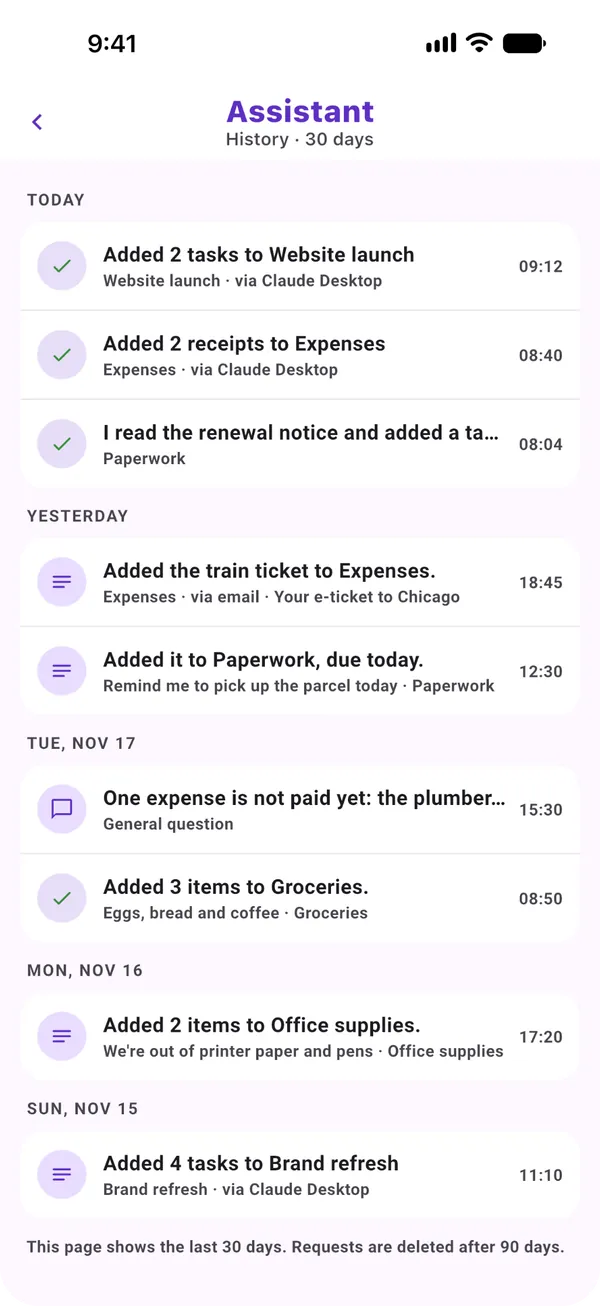
Each request to Moonto leaves a record, so you can see what it did and undo it: your request, the transcript of a voice message, a summary of the answer and what Undo needs. Changes made by email or by an AI assistant you connected are there too.
Settings › Assistant history shows the last 30 days. Records are deleted after 90 days, and « Delete the assistant's history », in Settings › Your data › Storage and privacy, removes them all at once.
Settings › Your data › Export my data makes one zip of all your lists, their rows and your « About me » facts, with a CSV file for each list that opens in any spreadsheet. Tick « Include attachments » to add your photos and voice clips, up to a size limit; the rest are listed in the archive.
Settings › Your data › Storage and privacy › Delete your account. You sign in once more to prove it's you, then confirm. Deletion happens at once and cannot be undone.
A list you own that other people still use is handed to another member rather than deleted, and what you added to other people's lists stays there for them. A few records remain, such as the purchase records needed for accounting; the privacy policy lists them, and you can ask us to delete the rest.
An account nobody has used for a year may also be deleted, unless it has ever paid, has a Checkpad or has a connection still set up.
Whatever you connect to Moonto reaches only what you allowed, and you can cut it off in Settings › Integrations at any time.
Changes an AI assistant makes through a connection show in your assistant history, where you can undo them.
This website loads Google Analytics only if you click Accept in its cookie banner. Decline, or make no choice, and nothing is sent; « Cookie settings » at the bottom of every page changes your answer. The web app asks the same question, and Settings › Cookie settings changes it there.
The iPhone and Android apps send crash reports and usage statistics, and offer no switch for them today. These carry fixed labels and counts with your Moonto user ID, never the text, voice, photos or anything else you put in Moonto, and they are not linked to your name or email.
How to check
In Settings › Your data: what is stored, where, and what the AI model sees, in plain words.
Export my data gives you a copy of everything you can open on your computer.
The privacy policy says all of this in full, with how long each thing is kept. Questions go to ar@moonto.app.
On iPhone, Android and the web, in 8 languages. Free to start.
Everyone you share with uses it free.